The ultimate campus security layer: essential VPN life hacks for students
Campus life requires constantly moving between dorms, libraries, and cafes, meaning a laptop often connects to multiple unpredictable networks a week. This is where student life hacks become practical.
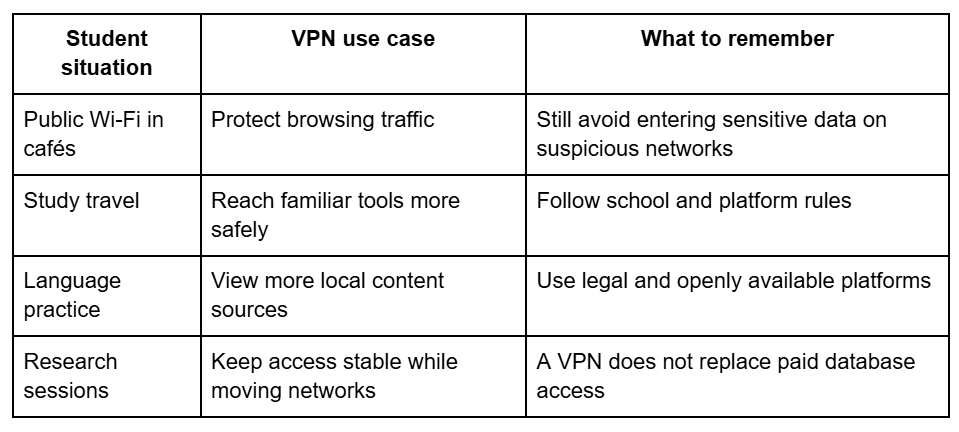
While a VPN doesn't replace university logins, it adds a secure layer to public Wi-Fi, protecting your data while traveling, helping access local content for language practice, and maintaining a steady study routine anywhere. The best-advised use is simple: secure the laptop first, then mind location for research, media, and just ordinary digital study.
A student who works with notes, course platforms, cloud storage, email, and online banking should care about more than speed. Public Wi-Fi can expose more than people think, especially when devices reconnect automatically. A VPN can help protect traffic when studying away from home or campus.
Students looking for a simple setup point can save https://toggle.org/download before preparing a laptop for study, travel, library work, and safer browsing on shared networks.
How a VPN turns a laptop into a safer study tool
A laptop usually carries much more of a student’s life than a backpack. It could hold essays, saved passwords, course portals, personal photos, bank tabs, calendar information, and files used for group projects. That makes hasty browsing risky, particularly on open networks. A VPN helps with this, encrypting internet traffic between your device and the VPN server, which makes public Wi-Fi less exposed. That doesn’t mean that students should act as though nothing is going to go wrong.
A VPN does not fix weak passwords, fake login pages, outdated software, or careless file sharing. It’s best seen as one piece of a typical safety routine. Update your operating system. Enable two-factor authentication on school accounts. Be careful not to use random browser extensions. Do not download “free” study files from sketchy sites just because they look useful.
A simple safety setup can look like this:
Update the laptop before major study travel.
Turn on two-factor authentication for school email.
Use a VPN on shared or public Wi-Fi.
Keep passwords in a trusted password manager.
Check URLs before logging into course platforms.
Avoid storing private files in unprotected folders.
These steps are not exciting, but they help protect the work students cannot afford to lose.
Productive leisure that still supports learning
Students need breaks, and not every helpful digital habit needs to resemble studying. A VPN can ensure access to expansive media discovery, particularly when students want documentaries, lectures, interviews, independent films, public cultural channels, or educational shows available in different regions. It allows leisure to strike a different tone, one that’s not so passive and more connected to something you actually care about. A media studies student may watch interviews with filmmakers from another country. A design student, for example, could follow architecture videos on public cultural channels. A history student could search for museum talks or recorded lectures.
For example, a language learner might watch local programs to hear everyday speech. Such global learning and leisure can be used to fuel essays, projects, class discussions and creative work without feeling like another chore. The healthy rule is simple: take advantage of legal services, abide by terms set by platforms and regard media discovery as inspiration — not a quick fix. Using a VPN can create open doors to other viewpoints, but students still need to select sources carefully.
Smart settings for a student's laptop VPN setup
A VPN becomes more useful when it is set up properly. Students often install tools quickly, then forget to check basic settings. That can leave gaps. Before relying on a VPN for campus life, it helps to review the options that affect privacy, speed, and daily use.
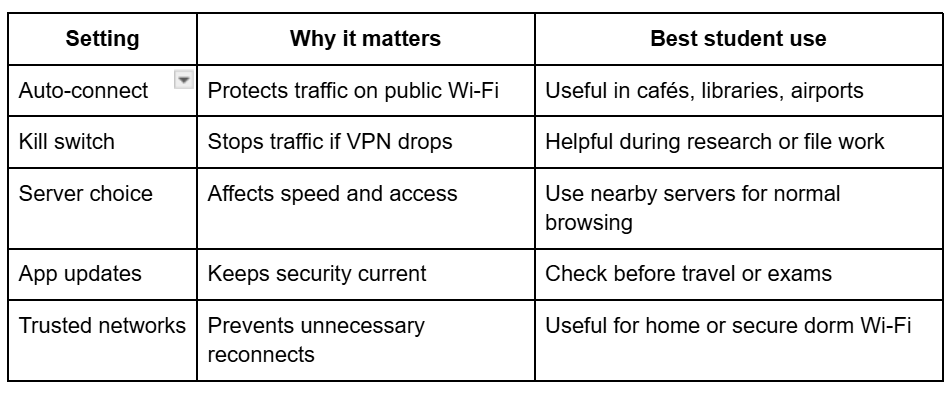
Student laptop VPN setup should include a few practical checks. Turn on auto-connect for public Wi-Fi if the tool supports it. Use a kill switch when available, especially for unstable networks. Choose nearby servers for speed when location does not matter. Use region settings only when there is a real reason. Keep the VPN app updated, because security tools also need maintenance.
A quick setup table helps keep choices clear:
A VPN should make daily browsing easier, not slower and more confusing. If the laptop becomes difficult to use, students will turn the tool off and forget about it.
Campus Wi-Fi privacy tips students should not ignore
VPN use works best with normal privacy habits. Campus networks can be busy, and students often work around others. A laptop screen may show private tabs. A phone may display login codes. Shared study tables are not private offices. Digital privacy includes the physical space around the device.
Basic campus Wi-Fi privacy advice helps prevent many common problems. Do not leave your laptop unlocked in the library. Do not store passwords in shared browsers. Your cloud folders always need to be organized, especially in the case of team projects. Log out of accounts on borrowed devices. Be careful with QR codes on posters or flyers, because fake links can look ordinary. A VPN does assist in the privacy of traffic, but it will not prevent someone from reading a password from a screen.
This is also where students should think about data habits. Download only what is needed. Delete old files with sensitive information. Keep personal and school accounts separate when possible. Use private browsing only when it helps, not as a magic privacy shield.