What a “paperless campus” actually requires
Every institution that announces a paperless goal eventually meets the same reality: getting rid of printers is the easy part. The harder work sits in the everyday paperwork that keeps a campus running, from enrollment packets and consent forms to purchase approvals and staff onboarding. A genuinely paperless campus depends less on grand strategy and more on whether front-line staff and students can complete routine document tasks without reaching for a scanner.

Photo credit: Pexels
Consider a registrar who receives a signed transcript request, a bursar who needs a payment authorization, and an admissions officer collecting recommendation letters. Each of these touchpoints involves a form that must be filled, reviewed, and signed. When staff know how to sign a PDF in a browser without printing, one small friction point disappears across thousands of interactions.
The rest of this piece breaks down the components most campuses underestimate: the document lifecycle, mobile realities, accessibility, security, and the change management that makes adoption stick.
Map the Document Lifecycle Before Buying Software
A paperless initiative that starts with a tool purchase usually produces expensive shelfware. The better sequence is to map how a document actually moves before deciding what technology fits. Most campus documents follow a predictable path, and naming each stage exposes where paper still creeps back in.
Here is a typical lifecycle for a student consent form, which mirrors most administrative paperwork on campus:
Creation: a template is built once and reused each term.
Distribution: the form reaches a student by email link or portal.
Completion: the student fills fields and applies an eSignature.
Review: staff confirm the entries are complete and legible.
Storage: the finished file is filed where it can be retrieved later.
Mapping these five stages tells you exactly which step forces someone to print, and that is where a browser-based editor earns its place.
Mobile Completion Is the Real Test
Students and adjunct staff rarely sit at a desktop when a form arrives. They open it on a phone between classes or during a commute, which means mobile completion is not a nice-to-have but the primary use case. A paperless plan that only works on a laptop quietly excludes a large share of its own audience.
This is where the details matter. A student who receives a field-trip waiver at 9 p.m. should be able to fill and sign it on the device already in their hand, and a clear guide on how to sign a PDF on an iPhone or another device removes a common support question before it reaches the help desk.
Accessibility and Inclusion Cannot Be an Afterthought
A paperless campus that ignores accessibility simply digitizes exclusion. Forms need proper reading order, labeled fields, and sufficient contrast so that assistive technology can interpret them. When these basics are missing, students who rely on screen readers hit a wall that paper never posed.
The practical baseline for most institutions is the Web Content Accessibility Guidelines, which can be used as a checklist. When digital forms are built and stored as tagged, structured files rather than flat scans, they remain readable, searchable, and far easier to update each term.

Photo credit: Pexels
Security, Retention, and Who Can See What
Campus documents carry sensitive data: identification numbers, financial details, health disclosures. Moving them online raises legitimate questions about encryption, access control, and how long records should be kept. These are governance questions, not just software settings, and they deserve a clear owner.
The table below contrasts common paper habits with the digital equivalents most institutions aim for, so committees can see the trade-offs at a glance.
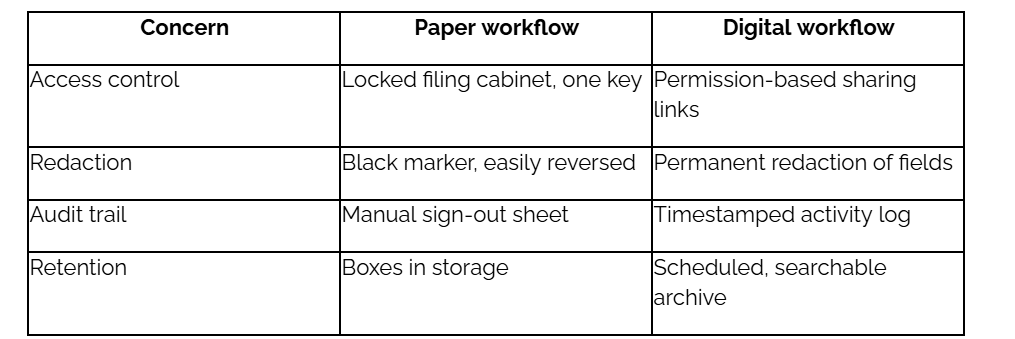
The takeaway is that digital workflows can strengthen control, not weaken it, but only as long as the institution confirms encryption, redaction, and retention rules with its own compliance and IT teams.
Make Adoption Stick Across Departments
Technology rarely fails on features; it fails on habits. A registrar who trusts a paper folder will keep printing until the digital path feels equally reliable. Sustained adoption comes from small, well-supported wins repeated across departments until the paperless option becomes the obvious one.
A short readiness checklist helps campus teams pressure-test their plan before a wide launch:
One reusable template exists for each high-volume form.
Staff and students can complete and sign on mobile, not just desktop.
Every form meets basic accessibility standards.
Access, redaction, and retention rules are documented and owned.
A named person handles support questions in the first term.
Working through this list surfaces gaps early, when they are cheap to fix. A paperless campus is ultimately a collection of small, repeatable document habits that hold up on any device. Institutions that treat it that way tend to keep the printers idle for good.