Google Classroom adds built-in audio, video, and screencast recording
New multimodal tools roll out to Education Plus and Teaching and Learning accounts, reducing reliance on third-party apps and reshaping assignment workflows.
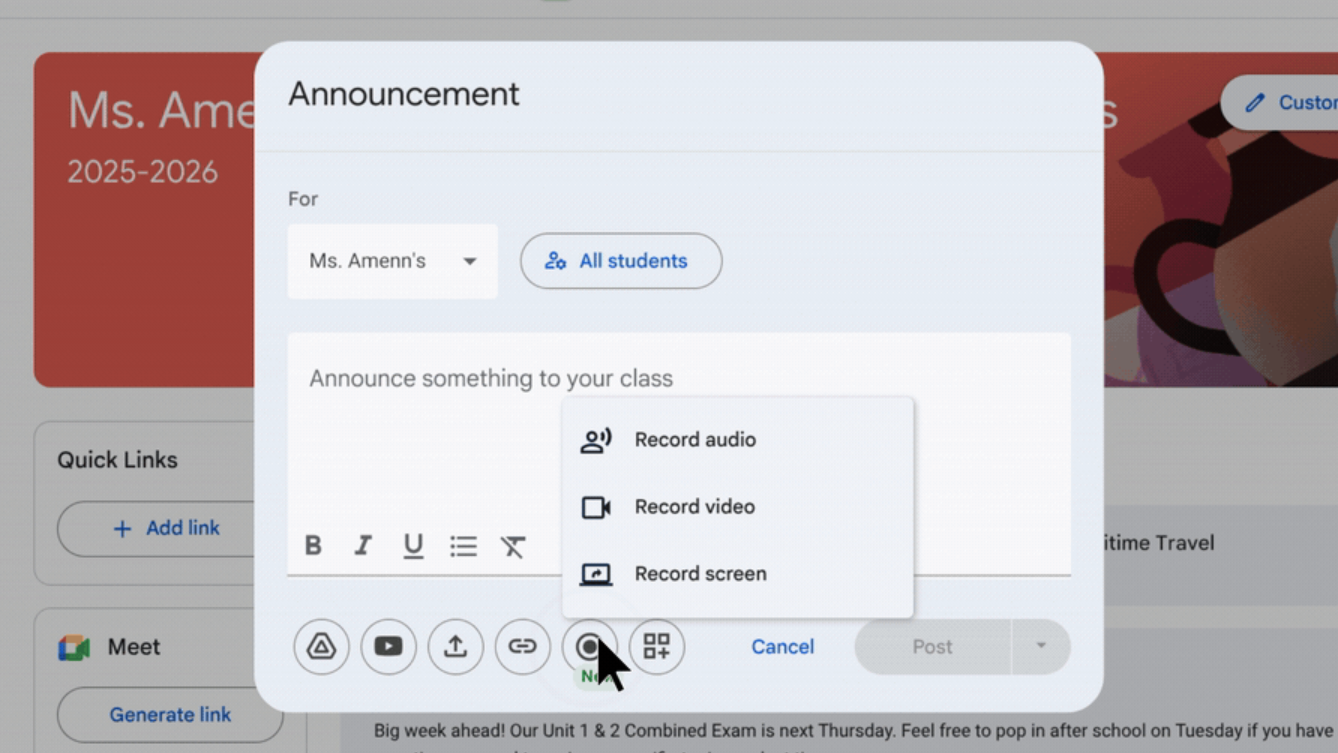
Google is rolling out native audio, video, and screencast recording directly within Google Classroom, giving teachers and students the ability to record and post content without leaving the platform.
The feature, available to Google Workspace Education Plus and Teaching and Learning add-on users, marks a shift toward fully integrated multimodal workflows inside Classroom.
Users in Rapid Release and Scheduled Release domains will see a record button embedded across key areas of Classroom. The functionality is web-only at launch and does not include an admin-level control.
Google states: “Starting today, we're bringing audio, video, and screencast recording functionality to Google Classroom. This new functionality is designed to help transform teaching and learning through multimodality, improving communication, intake, and retention for learners.”
Recording embedded across core workflows
Teachers and students, when permitted, can initiate, record, and post audio, video, or screencasts directly inside Classroom.
The feature appears in several areas:
Private comments, allowing teachers to provide spoken or screen-based feedback on submissions
Announcements and posts, enabling audio or video updates
Assignments, where teachers can record instructions for materials, quizzes, and questions
Submissions, where students can respond using audio, video, or screencasts
Google says: “Now, teachers and students (when permitted) will see a record button where they can initiate, record, and post audio, video, or screencasts without ever leaving Classroom.”
The company positions the feature as a way to address common pain points around typed feedback and limited personalization. It notes that teachers can provide pronunciation feedback, walk through technical material line-by-line using screen recordings, and deliver clearer assignment instructions through multimodal formats.
A built-in alternative to external tools
On LinkedIn, Luke Craig, Communities and Programs Lead at Google for Education UKI, said he was “most excited about is the ability to record audio, video and screen casts directly in Classroom.”
He added that it could be used by teachers to share instructions or by students when submitting assignments and described it as “an easy-to-use replacement for Flipgrid,” noting that the feature is rolling out to Education Plus and Teaching and Learning accounts.
While Google does not reference specific competitors in its official announcement, the integration reduces the need for third-party video response platforms by consolidating creation, feedback, and submission within Classroom itself.
Rollout and access
The feature is rolling out gradually. It is available to:
Google Workspace Education Plus
Teaching and Learning add-on
Students must have permission to post in Classroom in order to use the recording feature for announcements and posts. Teachers and students can access the tool via the web version of Classroom.
Google states: “Teachers and students will be able to initiate audio, video, and screencast recording in Google Classroom on web only.”
There is no separate admin toggle for the feature.
For districts already invested in Google’s ecosystem, the update deepens Classroom’s role as a central hub for instruction and assessment. For competitors offering standalone feedback and response tools, the shift reinforces a broader platform trend: reduce friction, keep users inside the ecosystem, and make multimodality default rather than optional.
ETIH Innovation Awards 2026
The ETIH Innovation Awards 2026 are now open and recognize education technology organizations delivering measurable impact across K–12, higher education, and lifelong learning. The awards are open to entries from the UK, the Americas, and internationally, with submissions assessed on evidence of outcomes and real-world application.