Schools and universities face changes to student licensing and shared storage from qualifying renewals in 2028, alongside a new app for assignments, grades and AI learning tools
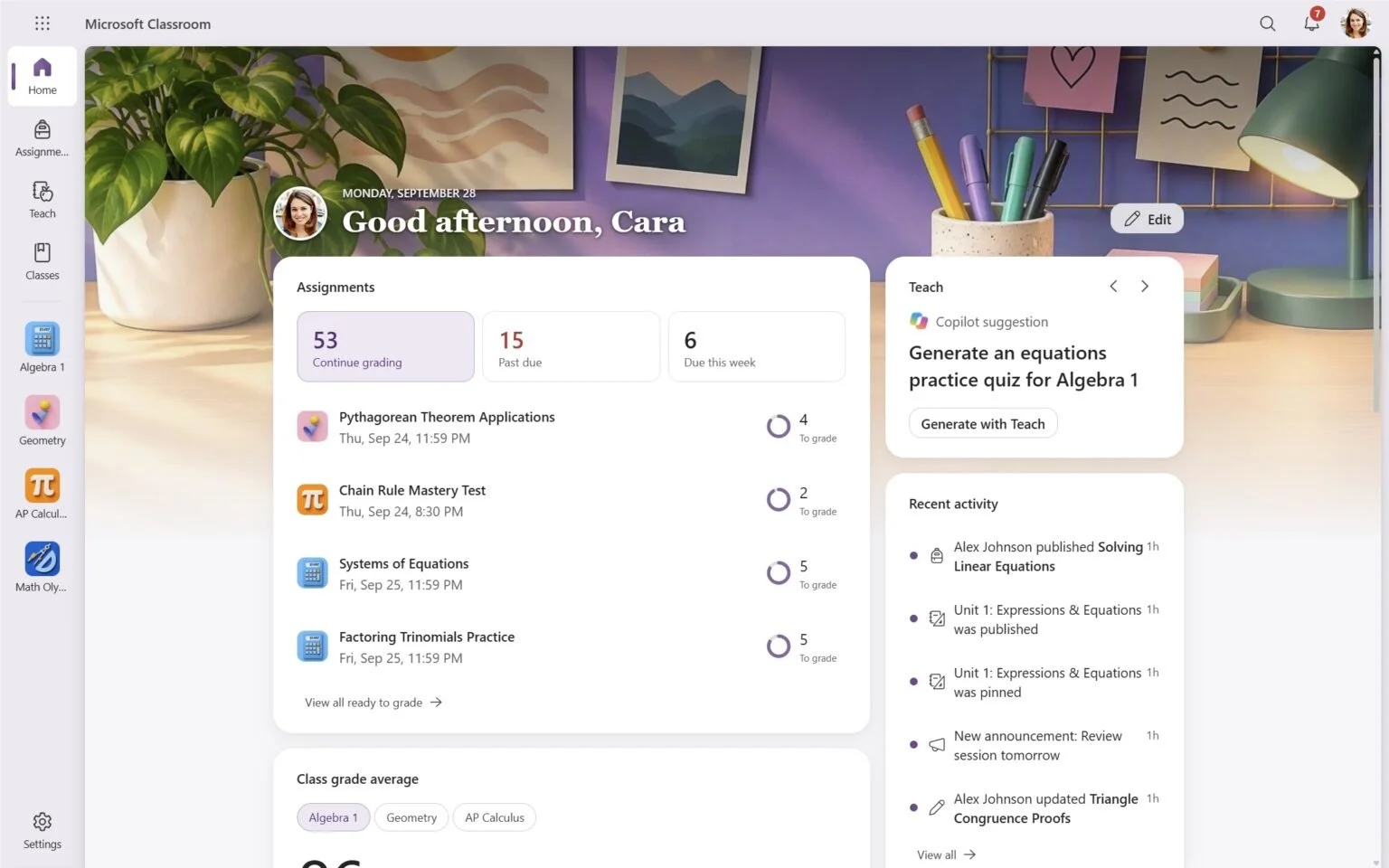
Microsoft Classroom will be included in paid Microsoft 365 Education A2, A3, A5 and A7 editions. Image: Microsoft.
Microsoft will retire free Office 365 A1 education licenses and the Student Use Benefit at institutions’ first contract renewal or extension on or after January 1, 2028, as it introduces a dedicated Microsoft Classroom app.
The changes will require schools and universities using those benefits to review which students need paid licenses. Microsoft’s replacement no-cost student edition, A0, will include Office applications but exclude Classroom, Teams, email and SharePoint.
Microsoft will also remove the existing 100 TB base storage allocation at the same renewal point. Institutions’ shared storage capacity will instead depend on their paid faculty and student licenses.
The announcement combines a new teaching environment with changes to how institutions purchase and manage Microsoft services. An earlier pricing change for online services bought through Academic Volume Licensing will begin at qualifying renewals from May 1, 2027.
Classroom brings assignments, grades and AI tools together
Microsoft Classroom will give K–12 schools and universities a separate environment for teaching and learning, with experiences tailored to elementary, secondary and university students.
Educators will be able to organize classwork, manage assignments and grades, and access the Teach module. Eligible students will be able to use the Study and Learn Agent through the app.
Class Notebook, Learning Accelerators, Education Insights and School Data Sync will also be brought into Classroom, alongside personalized homepages. The tools support classroom activities, learning practice, progress information and connections between institutional records and Microsoft’s education services.
Classroom will be included in paid Microsoft 365 Education A2, A3, A5 and A7 editions. Institutions will be able to assign different editions to different groups of users.
Teams for Education will remain available for communication and collaboration, with institutions able to choose Microsoft 365 Education editions with or without Teams.
Kees Hertogh, Vice President, Global Industry Marketing at Microsoft, says: “Institutions can use Microsoft Classroom and other learning features alongside their preferred collaboration platform or learning management system while benefiting from the broader Microsoft 365 Education experience.”
The company is also adding A7 above its existing A5 edition. The package brings together AI, security, governance and device management capabilities, including Microsoft Copilot, Microsoft Agent 365 and Microsoft Entra Suite.
A7 became generally available on October 1, 2026. The new A2 faculty and student editions are scheduled for December 1, 2026, followed by A0 and the updated A3 and A5 offerings on January 1, 2028.
Free student access will have new conditions
The replacement A0 edition will be available to eligible students actively using Windows devices for education. To qualify, their institution must have full paid faculty coverage on Microsoft 365 Education A2 or higher.
A0 will include Office desktop and web applications, Minecraft Education, OneDrive for Business and Microsoft Entra ID Free. Students who need Microsoft Classroom, Teams, Exchange Online email or SharePoint Online will require access through another license.
For institutions that currently rely on free student benefits, selecting replacement editions will involve looking beyond access to Office applications. Teaching tools, communication services, security, device management and AI capabilities will vary across the paid tiers.
Schools and universities will be able to mix faculty and student editions according to users’ requirements, with Classroom access beginning at A2.
Existing faculty editions will gain additional capabilities. A3 Faculty will add Microsoft Defender for Office 365 Plan 1, providing protection across email and collaboration services. A5 Faculty will add Microsoft Intune Suite for additional device management capabilities.
Those additions will come without an increase to the existing faculty suite list prices with Teams. An institution’s total renewal cost can still change as free benefits end, student licensing changes and volume licensing pricing is standardized.
Free Exchange Online for Alumni will also retire at the first applicable renewal or extension from January 1, 2028. Institutions seeking to continue the service will need to consider Microsoft’s new paid alumni offering.
Storage capacity will depend on paid licenses
Removing the 100 TB base allocation will change how institutions calculate the storage available across their Microsoft services.
Paid student licenses will contribute capacity to the shared institutional pool for the first time. Each A2 student license will add 4 GB, rising to 8 GB for A3 and 12 GB for either A5 or A7.
Faculty contributions will also increase. Each paid A2 faculty license will add 50 GB, compared with 75 GB for A3 and 150 GB for either A5 or A7.
These amounts contribute to the institution’s shared pool. Schools and universities will need to compare their current storage usage with the capacity generated by their planned combination of paid licenses.
The storage change and retirement of existing free benefits will take effect at each institution’s first contract renewal or extension on or after January 1, 2028. Institutions partway through an existing agreement will move according to that renewal timetable.
Before then, Microsoft will standardize pricing across price levels for online services purchased through Academic Volume Licensing. That change applies at the first contract renewal or extension on or after May 1, 2027.
Hertogh states: “Existing agreements, pricing, licenses, and entitlements remain in effect until the applicable renewal or extension.”
Microsoft is asking institutions to confirm their renewal dates, review license assignments and benefits, assess their faculty-to-student mix, and measure storage usage. Account teams and partners will work with institutions to identify replacement licenses and develop transition plans before renewal.
ETIH Innovation Awards 2027 open for entries
The ETIH Innovation Awards 2027 are now open for entries, with 26 categories recognising companies, institutions, projects and individuals making a measurable impact across education technology. The global awards span AI in education, digital learning, higher education, skills and workforce, inclusion, education operations, evidence and impact, with entries managed through ETIH’s new online awards platform.
Entries are open worldwide, with the early-bird deadline on Friday 18 December 2026 and the final entry deadline on Friday 26 February 2027 at 23:59 UK time.
Explore the 2027 categories and judging criteria, read the How to Enter guide or start an entry through the ETIH Innovation Awards 2027 platform.