Microsoft overhauls Copilot with Autopilot agents and app-building tools
The biggest Copilot update to date adds long-running AI agents, natural-language app creation and deeper Office integration as Microsoft pushes the platform further into everyday enterprise work
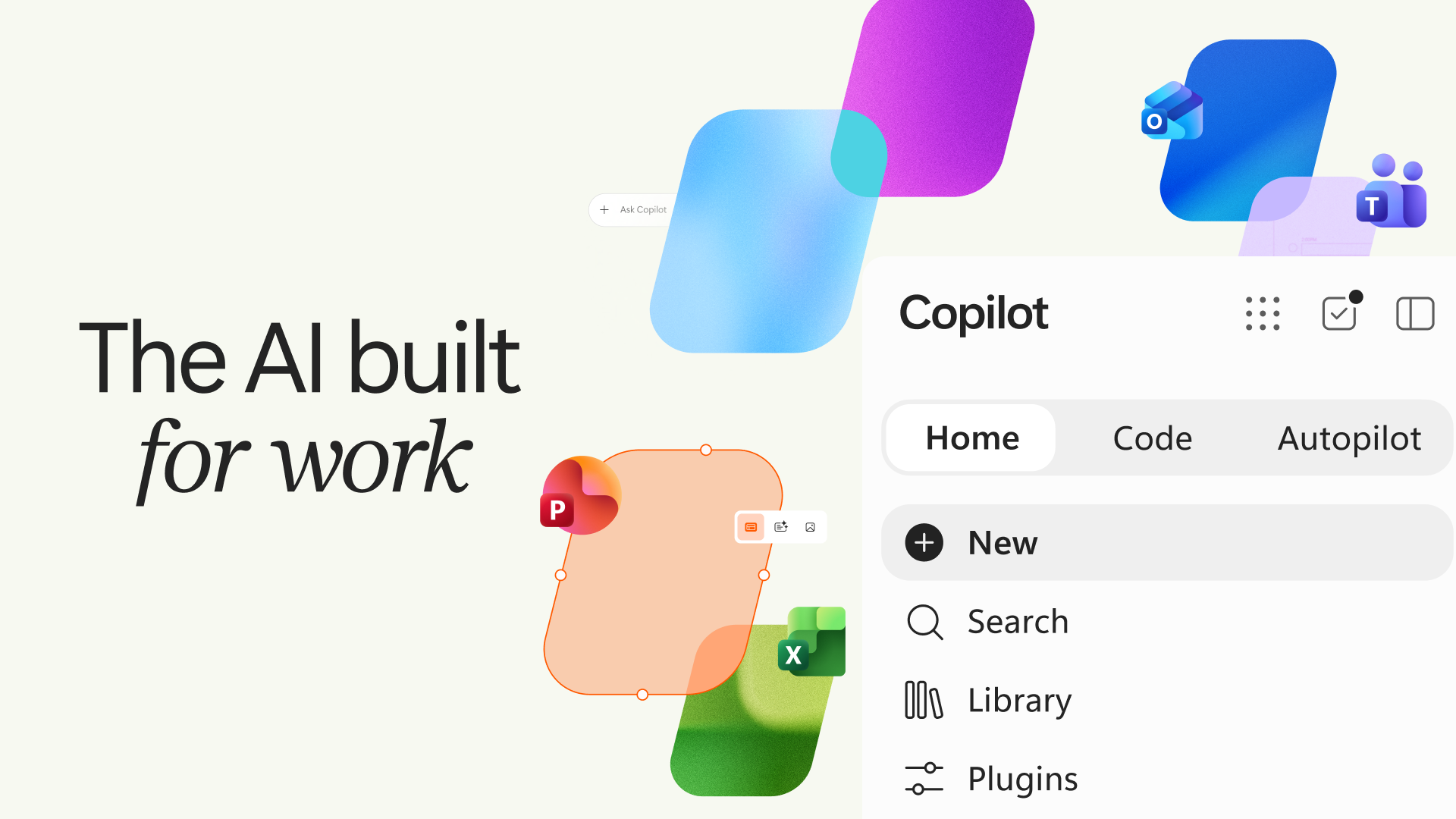
Microsoft’s latest Copilot update introduces Home, Code and Autopilot alongside deeper integration with Office and Teams
Microsoft has unveiled a major redesign of Copilot, adding long-running AI agents, app-building tools and a new Home experience as it develops the platform into what CEO Satya Nadella described as a new “OS for work.”
The update reorganizes Copilot around three main capabilities: Home, Code and Autopilot. Office is also being brought directly into Copilot, while Microsoft is extending the assistant across Teams, Outlook and other Microsoft 365 services.
Some of the new features will arrive gradually. Home and Code will begin rolling out through Microsoft’s Frontier program in the coming weeks, while Autopilot is moving into private preview at the end of September.
Writing on LinkedIn, Nadella said the company is building Copilot to span “every model, every form factor, and every task,” moving AI from answering individual questions towards building applications and carrying out work over longer periods.
Autopilot keeps working after the prompt ends
The biggest change in how Copilot operates comes through Autopilot, previously known as Scout.
Users give the agent a name, role and objective, after which it can continue working without waiting for another prompt. Microsoft says it can monitor channels, follow up on conversations, perform recurring work and return to projects days later.
One example involves running a supplier review process, where Autopilot can create a schedule and workback plan, prepare for meetings, handle follow-ups and request updates from stakeholders.
Because the agent is cloud-hosted, Microsoft says it can continue running while the user is offline. It has its own identity, memory, computer and workspace inside an organization’s tenant, with permissions, audit controls and governance built around it.
The company is also integrating the agent into the places employees already work. Autopilot can appear in Teams, Outlook, chats, channels and documents and can be mentioned in much the same way as a colleague.
Microsoft is separately preparing a feature called Today, which will draw from email, calendars, Teams conversations, meetings and tasks to identify work requiring attention and prepare actions such as drafts, proposed schedule changes and follow-ups.
Today enters private preview in Copilot in October, with versions also planned for Outlook and Teams.
Copilot Code lets employees build their own apps
Microsoft is also opening software creation to employees who are not developers through a new Copilot Code experience.
Users will be able to describe an app, tracker, dashboard, automation or workflow in natural language and have Copilot build it.
The feature uses underlying technology from GitHub Copilot but is aimed at business users creating smaller, purpose-built tools rather than professional software development.
Microsoft is pitching those tools as another basic unit of knowledge work alongside documents, spreadsheets and presentations.
Code can create anything from desktop widgets and interactive dashboards to cloud-hosted internal applications. The resulting software can be hosted inside an organization’s Microsoft tenant and run through a sandboxed environment.
Supporting that is Microsoft Copilot Managed Runtime, new infrastructure designed to let code created through Copilot run inside Microsoft 365 environments under IT governance.
Code is due to reach the Frontier program at the end of September before broader availability in the following weeks. Microsoft says a preview will also reach Microsoft 365 Premium and Pro subscribers later in 2026.
Office moves inside Copilot
Home becomes the main starting point for the redesigned Copilot, combining Chat with Cowork, Microsoft’s environment for delegating longer and more complex tasks.
Users can move between quick conversational work and jobs that Copilot carries out from start to finish, such as preparing a customer briefing, launch kit or financial close package.
Word, Excel and PowerPoint are also being embedded directly into Copilot. The idea is to let users create and edit actual Office files alongside their AI conversation rather than generating content that then has to be transferred into another application.
Microsoft says Copilot can draft documents, model budgets and build presentations from Home, with changes remaining synchronized between Copilot and the underlying Office applications.
The update extends to Teams too. A new @Copilot capability will allow the AI to use the shared context and permissions of a channel, group chat or meeting when answering questions or preparing follow-up work. That feature is expected in private preview by the end of September.
The expansion brings new cost controls as well. Microsoft is introducing additional FinOps for AI features to help organizations manage usage-based spending across agentic tools including Cowork, Code and Autopilot, alongside controls over which AI model families different groups can access.
The wider Copilot rollout is beginning through Microsoft’s Frontier program, with Microsoft planning to show further developments at Ignite in San Francisco and online from November 17 to 20.