EDUwidgets launches Chrome extension for classroom tools across any website
Free browser overlay from The EdTech Way gives teachers timers, traffic lights, name pickers, stickers, and other classroom tools without accounts, tracking, or tab switching.
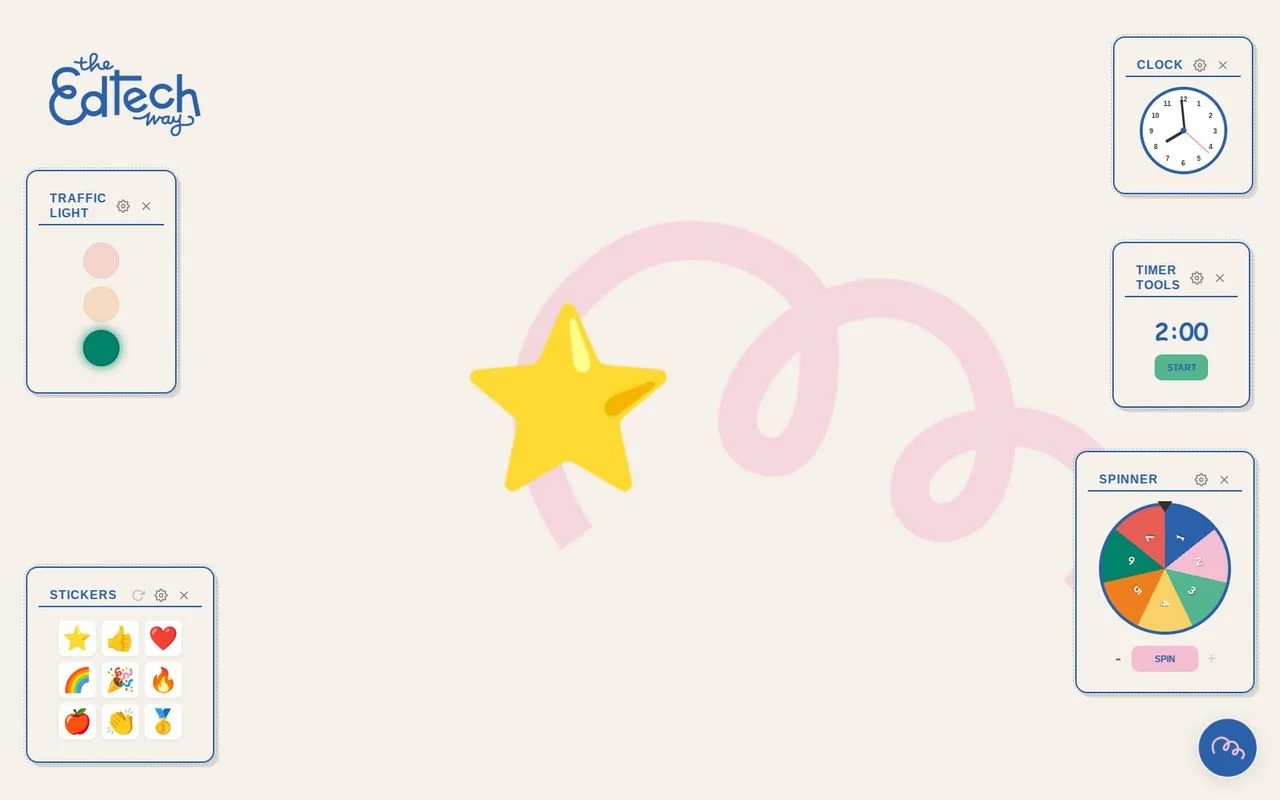
EDUwidgets has launched globally as a free Chrome extension that places classroom tools over any website.
EDUwidgets has launched globally in the Chrome Web Store, giving teachers a free browser extension that places classroom management and interaction tools directly over any website.
The extension was created by Kim van Veenendaal, Founder and Strategic Adviser AI in Education at The EdTech Way, after a Gemini Hackathon on April 1st. The idea came from a classroom request for simple tools such as a timer, traffic light, and name picker that could stay visible during instruction without requiring teachers to leave Google Slides or switch between browser tabs.
EDUwidgets is available in 12 languages and is designed for teachers, trainers, IT administrators, and school organizations. The extension can be used during live instruction for lesson timing, student selection, visual cues, rewards, classroom routines, and on-screen prompts.
The tool runs locally in the browser, with no servers, no user accounts, no tracking, and no personal data collection. Class lists and widget settings remain on the user’s own device, a design choice intended to reduce privacy and administration barriers for schools.
The Chrome extension is free to use and can be deployed across a school domain through Chrome extension management.
Classroom tools stay visible during live instruction
EDUwidgets works as a floating overlay on top of a teacher’s browser tab. That means tools can remain available while teachers move through web-based teaching materials, including Google Slides, without interrupting the lesson flow.
Van Veenendaal wrote: "What started as a personal 'vibe coding' experiment with Gemini is now live globally in the Chrome Web Store—translated into 12 languages!"
She added: "As an EdTech entrepreneur, I am always looking for ways to make technology work for teachers. During my Gemini Hackathon on April 1st, I asked one of the attendees, Kathelijne, what she was really missing in her daily classroom routine. Her answer was clear: she wanted simple, interactive tools like a timer, traffic light, or name picker that 'travel' with her across any website, without having to switch tabs during an instruction in Google Slides."
The launch version includes nine modules: Traffic Light, Timer Tools, Name Picker, Spinner, Dice, Clock & Time, Learning Goal, Stickers, and Spotlight.
Traffic Light gives teachers a visual way to show the expected working mode in class, with red, amber, and green settings and the option to add text instructions. Timer Tools include a timer, stopwatch, interval timer, and visual Time Timer, with adjustable color, duration, and sound signals.
Name Picker allows teachers to import class lists and save them locally. It includes a "Grab Bag" memory function, allowing teachers to set how many times each name can be drawn. Spinner offers a customizable wheel with editable segments, colors, labels, and a memory function for more even distribution of outcomes.
Local browser design addresses school privacy checks
EDUwidgets has been built to operate fully in the browser. Class lists, settings, and widget activity remain on the user’s device rather than being sent to external servers.
Van Veenendaal wrote: "GDPR compliant by design: EDUwidgets operates 100% locally in the browser. No servers are used, no user data is collected, and no accounts are needed. This means zero administrative or privacy hurdles for your school's privacy officer."
The privacy addendum states that class lists and settings never leave the user’s computer, and that EDUwidgets does not collect usage statistics or personal data.
The extension also includes scaling controls. Teachers can resize all widgets with a global slider, while Dice, Learning Goal, and Spotlight can be resized individually by dragging their corners.
Spotlight allows teachers to copy an image or take a screenshot and paste it directly as a floating widget over a lesson. Learning Goal includes an editor for bold text and colors, while Stickers allows teachers to display emoji-style rewards on screen for a set duration.
Gemini experiment becomes global teacher tool
Van Veenendaal built EDUwidgets from a "vibe coding" experiment with Google Gemini, moving the project from hackathon concept to public Chrome extension.
She previously worked as Adoption Program Manager Education Benelux at Google, where her role covered Google for Education adoption, certification programs, community management, partner work, and training. She now runs The EdTech Way, supporting school boards and education institutions with educational technology, Google Gemini, AI implementation, Google Workspace for Education, and teacher training.
EDUwidgets is available to add to Chrome for free. Van Veenendaal is asking users to share feedback on translation errors, feature requests, and which widgets are most useful in classrooms.